ShopDreamUp AI ArtDreamUp
Deviation Actions


Suggested Deviants


Suggested Collections


You Might Like…


Featured in Groups




Description
Please go see my Journal entry about future Gaia Orb declinations! [link]
The "small" taskbar version can be found Here
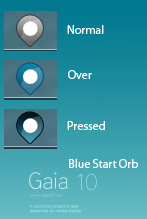
Just a simple custom start orb base of a Mockup from Oiko on the Gaia 2010 forum website, Gaia10.us forum
The .zip contains 2 versions
- bottom taskbar
- top taskbar
Two solutions to change the start orb
1) The easiest way to change your start orb is with the start orb changer: Start Orb Changer
All you have to do is to use one of my images to replace your start orb, such as image 6801.bmp.
2) Changing start orb using Resource Hacker/Restorator
Go there for a tutorial -> Tuto
Each of the three bitmaps (6801/6805/6809) are the same exact image. I included all three bitmaps to avoid confusion as most people don't realize you can drag the 6801 bitmap in Resource Hacker/Restorator for each of the 3 files that need to be replaced.
I also included the explorer.exe (x32/x64) for simplicity!
Just use Windows Theme Installer to change yours!
NB: I take no responsibilities if you perform incorrect modifications to your computer.
The "small" taskbar version can be found Here
Just a simple custom start orb base of a Mockup from Oiko on the Gaia 2010 forum website, Gaia10.us forum
The .zip contains 2 versions
- bottom taskbar
- top taskbar
Two solutions to change the start orb
1) The easiest way to change your start orb is with the start orb changer: Start Orb Changer
All you have to do is to use one of my images to replace your start orb, such as image 6801.bmp.
2) Changing start orb using Resource Hacker/Restorator
Go there for a tutorial -> Tuto
Each of the three bitmaps (6801/6805/6809) are the same exact image. I included all three bitmaps to avoid confusion as most people don't realize you can drag the 6801 bitmap in Resource Hacker/Restorator for each of the 3 files that need to be replaced.
I also included the explorer.exe (x32/x64) for simplicity!
Just use Windows Theme Installer to change yours!
NB: I take no responsibilities if you perform incorrect modifications to your computer.
© 2010 - 2024 khios
Comments12
Join the community to add your comment. Already a deviant? Log In
GRACIAS